
Whole-Home Wi-Fi Performance Optimization
Your home’s Wi-Fi should work reliably in every room, not just next to the router. Merrimack Valley Wi-Fi PROS evaluates your home, your existing network, and the factors affecting wireless performance to identify what is causing the problem and design the right solution for your home.

Solve the Problems Affecting Your Home’s Wi-Fi
When Wi-Fi is slow, unreliable, or inconsistent, the solution isn’t always a faster internet plan or another router. The problem may be how the network was designed, where equipment is located, how it is connected, the construction of your home, or equipment that is no longer right for the job.
Merrimack Valley Wi-Fi PROS takes a whole-home approach. We evaluate how your home, network infrastructure, and Wi-Fi equipment work together, identify what is limiting performance, and determine what needs to change.
Depending on what we find, the right solution may involve repositioning access points, improving wired connections, changing network configuration, replacing unsuitable equipment, or redesigning portions of the network. We use proven equipment and solutions that we know, support, and can properly configure for your home.
The goal is simple: reliable, consistent Wi-Fi everywhere you need it.
Signs Your Wi-Fi Network Needs A Better Solution
Wi-Fi problems are often symptoms of a network that was not properly designed for the home—its size, layout, construction, and how and where Wi-Fi is actually used.
You may be experiencing:
Wi-Fi slows down during busy times of the day
Streaming services buffer frequently
Video meetings freeze or disconnect
Smart home devices randomly go offline
Devices lose connection while moving around the house
Wi-Fi performance varies significantly from room to room
These problems can be caused by network design, equipment, access point placement, wireless interference, how the network is connected, or the way your home’s construction affects Wi-Fi signals—not necessarily your internet service.
Our Whole-Home Wi-Fi Optimization Process
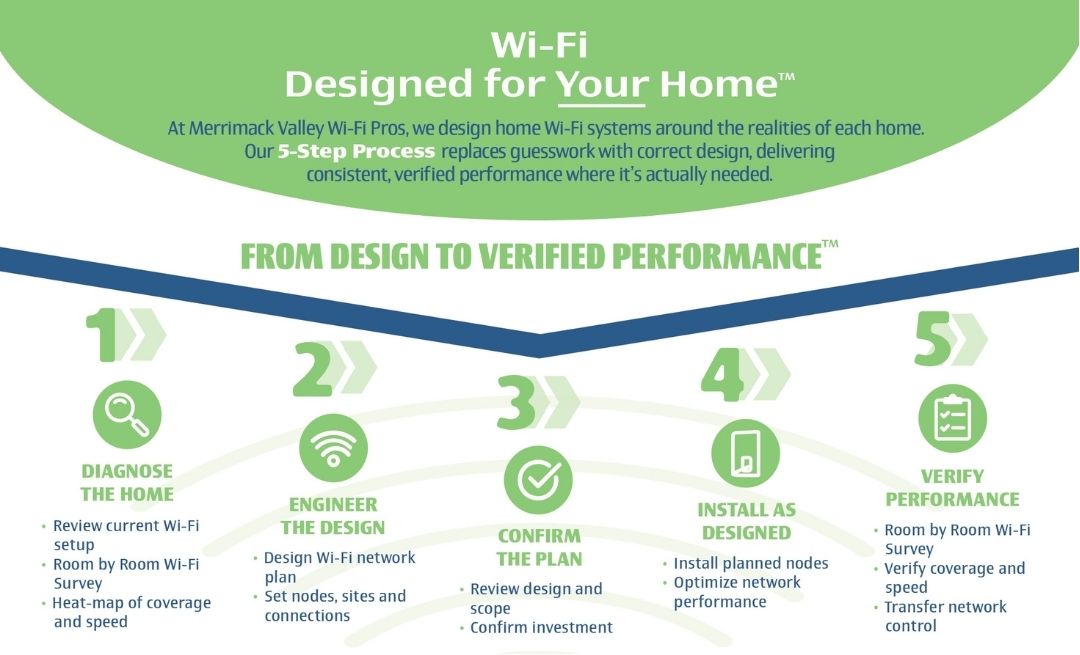
We Optimize Your Network for Reliable Performance
Every home presents different challenges. That’s why we don’t take a one-size-fits-all approach to Wi-Fi.
We evaluate your home and existing network to understand what is affecting wireless performance, including:
Wi-Fi signal strength and quality
Coverage throughout the home
Access point and equipment placement
Channel congestion and wireless interference
Existing Ethernet or coax infrastructure
Wired and wireless connections between network equipment
Roaming performance between access points
Access point performance
From there, we determine what needs to change to deliver more reliable, consistent Wi-Fi. That may mean improving access point placement, wired connections, network configuration, or portions of the network design. If existing equipment is no longer appropriate for the home, we may recommend replacing it with proven equipment that we know, support, and can properly configure.
The objective is not simply faster Wi-Fi—it’s Wi-Fi that performs reliably everywhere you need it.
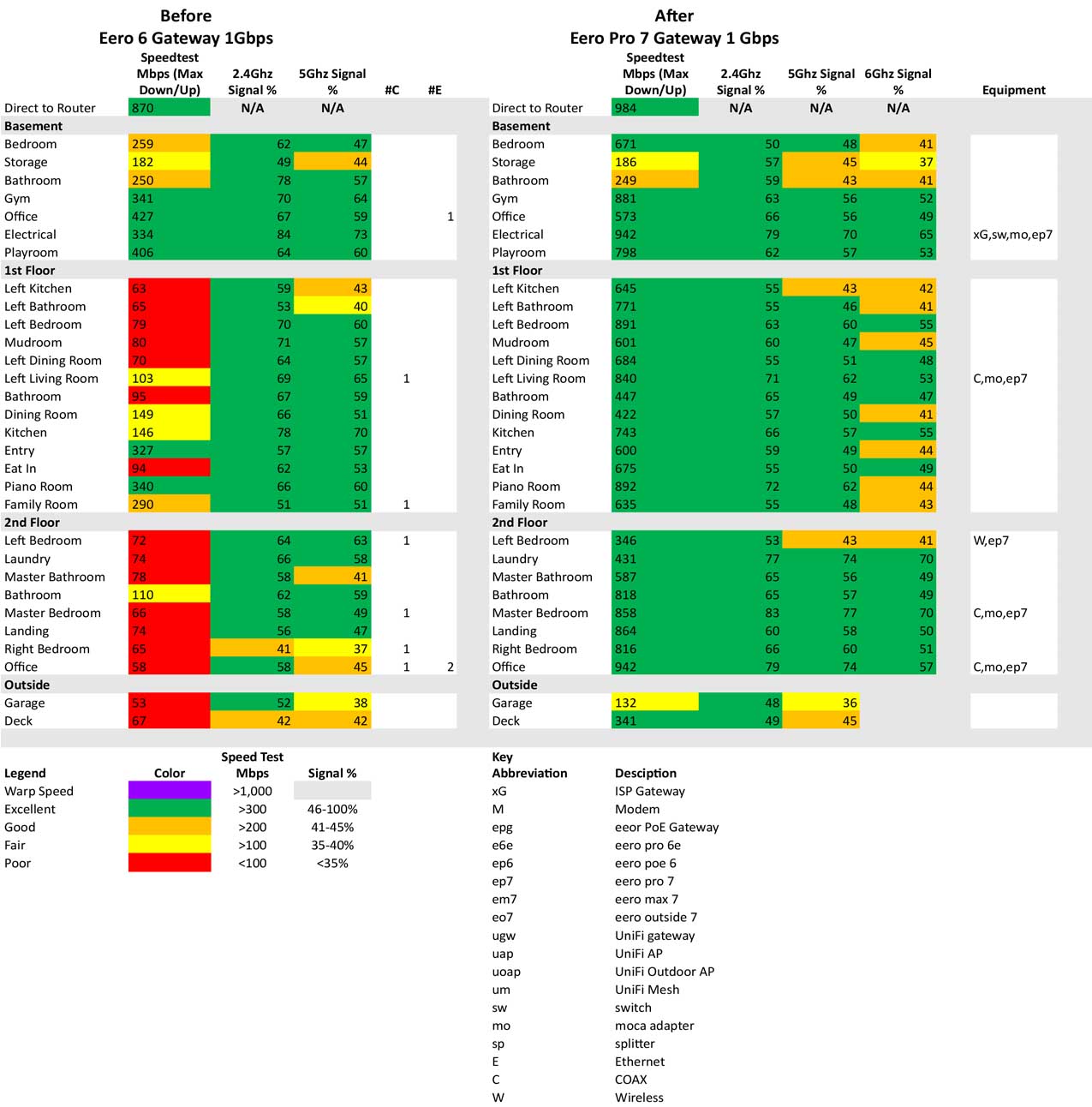
We Optimize Your Network for Maximum Performance
Every home is different, which means every Wi-Fi network requires a unique approach.
Our optimization process focuses on improving the performance of your existing network by evaluating how your home’s layout, building materials, and connected devices impact wireless connectivity.
We analyze:
Wireless signal strength
Network coverage
Equipment placement
Channel congestion
RF interference
Access point performance
Existing Ethernet infrastructure
Device connectivity
Roaming performance between access points
By identifying the root cause of your Wi-Fi issues, we can make targeted improvements that deliver faster speeds and more consistent performance.

Built for the Way You Use Your Home
Wi-Fi has become essential to how we work, communicate, and relax at home. Your network may need to reliably support:
Remote work and video conferencing
Streaming television and entertainment
Online gaming
Smartphones, tablets, and computers
Voice assistants and connected appliances
Multiple people using Wi-Fi at the same time
Smart home automation and lighting
Security cameras and video doorbells
A properly designed Wi-Fi network accounts for where and how you use these devices—not simply how many you have—so your Wi-Fi performs reliably when and where you need it.
Stop Living With Unreliable Wi-Fi
If you’ve tried restarting your router, upgrading your internet plan, or adding more equipment and your Wi-Fi still doesn’t perform the way it should, it’s time to find out what is actually causing the problem.
Merrimack Valley Wi-Fi PROS evaluates your home, existing network, equipment, and wireless performance to identify what is limiting your Wi-Fi and determine what needs to change.
You don’t have to keep experimenting with routers, mesh systems, or internet speed upgrades. Get Wi-Fi designed to work reliably everywhere you need it.
Contact Merrimack Valley Wi-Fi PROS today to schedule a Whole-Home Wi-Fi Performance Optimization consultation.
Frequently Asked Questions
Will getting faster internet make my Wi-Fi better?
Not necessarily. Your internet plan determines the raw bandwidth entering your home gateway, while Wi-Fi is the wireless radio signal distributing that data. If your Wi-Fi signal is weakened by physical walls, paying for a 1 Gbps or 2 Gbps internet plan will not fix dead zones in far bedrooms.
Do I need a more expensive router to get better Wi-Fi?
No. All consumer routers operate under strict federal transmit power limits, meaning a $600 router cannot push signals through heavy walls any better than a $100 router. In homes over 2,500 square feet, system architecture, hardwired backhauls, and access point placement matter far more than single-router hardware cost.
Should I replace my router if it's old?
Equipment shouldn’t be replaced simply due to age. We evaluate whether your existing hardware can support modern Wi-Fi 7 standards, multi-gigabit throughput, and your household’s device load. If the core foundation is solid, optimizing placement or offloading traffic onto hardwired connections may be all that is needed.
Do I really need Ethernet if I have Wi-Fi?
Yes. At Merrimack Valley Wi-Fi PROS, we view Wi-Fi as the “last ten feet” of airtime connection to your mobile devices. Offloading stationary devices (like Smart TVs, gaming consoles, and work PCs) onto a hardwired Ethernet or MoCA coax backbone keeps wireless airwaves free and congestion-free.
Can existing coax cable be used for my home network?
Yes. Using MoCA 2.5 (Multimedia over Coax) adapters, we turn unused RG6 coaxial wall outlets into a hardwired 2.5 Gbps network backbone. This delivers gigabit speed to distant access points without cutting into drywall or fishing new wires.
Can too many smart home devices slow down my Wi-Fi?
Smart plugs, thermostats, and leak sensors use minimal bandwidth, but hundreds of IoT devices on legacy routers cause wireless airtime congestion. Upgrading to a Wi-Fi 7 network architecture efficiently manages dense device loads without slowing down your primary laptops or phones.
Why does my Wi-Fi get worse when more people are working from home?
Video meetings need audio and video to arrive consistently and on time. Unlike a streamed movie, a live conversation cannot buffer far ahead to hide network delays. Late or missing data can cause frozen video, choppy audio, and interruptions.
Wi-Fi devices share available wireless transmission time. Multiple video calls, large file transfers, and other activity can compete for that time and introduce delays—even when an internet speed test looks good.
Merrimack Valley Wi-Fi Pros evaluates coverage, network capacity, and internet performance, including upload capacity. We prefer wired connections for access points and work computers where practical to reduce wireless competition and support reliable video meetings.